August 7, 2026 · asma
10 Best Free SERP Checker Tools for Tracking Google Rankings
Discover the 10 best free SERP checker tools for tracking Google rankings, analyzing search results, monitoring keywords, and improving SEO performance. Compare tools like Google Search Console, Ahrefs, WhatsMySERP, SERPROBOT, and SeoWorx to find the right option for your SEO needs.
Best Free SERP Checker Tools for Verified Data and Quick SERP Snapshots
Tool #1: Google Search Console — Best Free Option for Verified Site Ranking Data
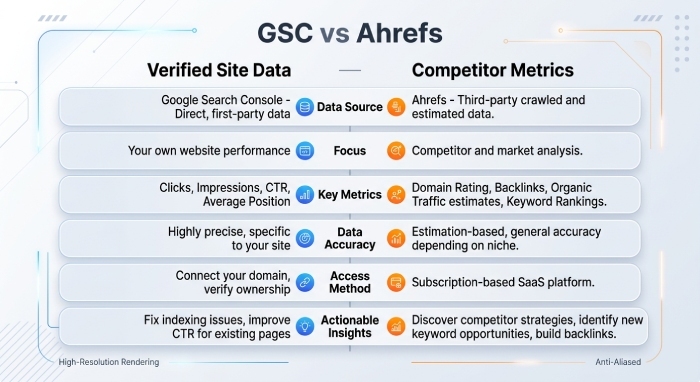
Google Search Console is the best starting point for verified ranking data because it reports how your own verified Google domain performs in Google search results. It is not a traditional SERP checker in the same way as a live rank checker, but it shows impressions, clicks, average ranking position, click-through rate, search query data, and search traffic trends directly from Google Search.
For organic search performance, Google Search Console is especially useful because it connects keyword analysis with actual performance reports. You can review which pages earn impressions, which search engine queries generate clicks, and whether a ranking position is improving or declining over time.
Its limitations are important: it does not show full competitor tracking, backlink metrics, domain rating, URL rating, referring domains, or live SERP analysis. It also does not simulate incognito mode, a proxy or VPN, or location-based results with the same precision as a dedicated SERP checker. Still, for verified organic search data, it remains essential.
Best use case
Use Google Search Console to validate ranking reports, monitor organic search visibility, and compare your average ranking position against data from a third-party SERP Checker tool.
Tool #2: Ahrefs Free SERP Checker — Best for Quick Google SERP Snapshots
The Ahrefs Free SERP Checker is one of the strongest free options for quick Google search results snapshots. It shows ranking position data alongside Ahrefs SEO stats such as Domain Rating, URL Rating, backlink metrics, referring domains, estimated search traffic, and ranking difficulty.
For keyword analysis, Ahrefs is valuable because it connects SERP analysis with competition analysis. You can see whether top-ranking pages have strong Backlinks, high domain rating, powerful URL rating, or significant referring domains. That makes it easier to judge whether your page can compete in organic search.
Ahrefs also fits naturally into a broader SEO workflow with Site Explorer, Keywords Explorer, the Site Explorer tool, and the Ahrefs SEO Toolbar. While the free SERP checker does not replace full position tracking, it is excellent for checking desktop results, search volume context, keyword ideas, and a live organic snippet landscape.
Best use case
Use Ahrefs when you need a fast SERP checker that combines Google search results with backlink metrics, domain rating, and ranking difficulty.
Free Rank Checker Tools for Monitoring and Bulk Checks
Tool #3: WhatsMySERP — Best Free Rank Tracker for Ongoing Keyword Monitoring
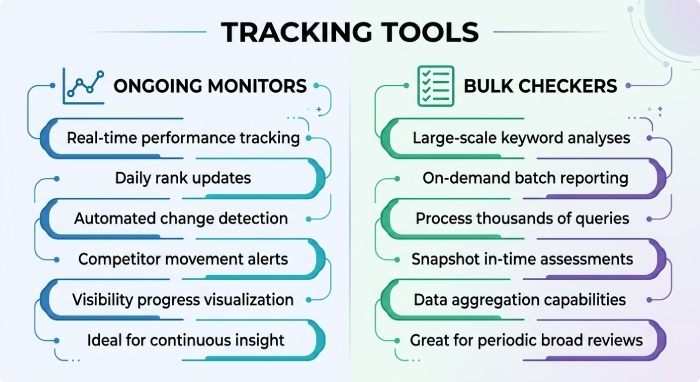
WhatsMySERP is a practical free rank checker for ongoing keyword monitoring. It is designed to track keywords, review Google search results, and monitor ranking position changes without requiring a complex SEO platform.
For small businesses, bloggers, and local SEO teams, WhatsMySerp works well because it simplifies position tracking. You can check organic search rankings, compare mobile results and desktop results, and watch how a search query performs over time. This makes it useful for basic SERP position history and recurring ranking reports.
The platform is especially helpful when you want a lightweight SERP Tracker rather than a full project management suite. It will not provide the same level of backlink metrics, domain rating, or referring domains as Ahrefs, but it gives enough real-time data to support keyword analysis and local SEO monitoring.
Tool #4: SERPRobot — Best for Simple Bulk Google Ranking Checks
SERPROBOT is built for fast, simple bulk Google ranking checks. If you need to enter multiple keywords and quickly identify ranking position data, this SERP checker is easy to use and efficient.
SERPRobot is useful for agencies, freelancers, and SEO Services providers who need a rank checker for repeated checks across several search engine queries. It can help identify ranking movement in Google search results, detect changes in organic search performance, and support basic competitor tracking.
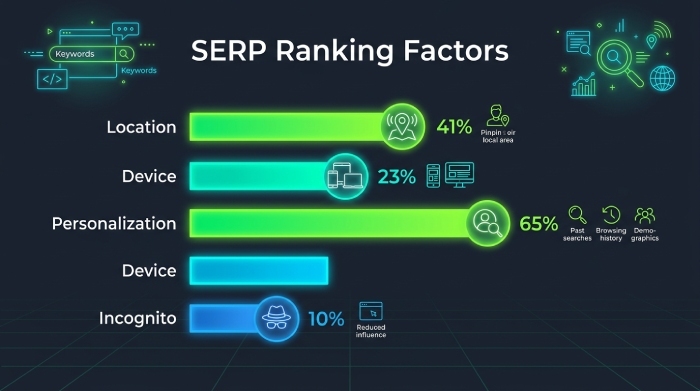
For local SEO, SERPROBOT can also be useful when checking location-based results. However, as with any free SERP checker, remember that search personalization, incognito mode, device type, and proxy or VPN settings can influence what you see. A dedicated SERP position tracker may be better for automated checks and long-term performance reports.
Fast Keyword Position Tools for Domains, Countries, and Basic SERP Tracking
Tool #5: SEO Review Tools Google Rank Checker — Best for Fast Keyword Position Checks
SEO Review Tools Google Rank Checker is a straightforward online tool for checking a keyword’s ranking position against a specific domain. It is ideal when you want a quick rank checker without opening a full dashboard.
This type of SERP checker is helpful for basic keyword analysis, especially when reviewing whether a page appears in Google search results for a target search query. It can support organic search audits, title tag checks, meta description reviews, and quick SERP snippet comparisons.
It does not typically provide advanced backlink metrics, domain rating, URL Rating, heatmap analysis, or detailed SERP position history. Still, it is useful for confirming whether a unique page title, organic snippet, or SERP snippet is gaining visibility.
Best use case
Use it for fast keyword position checks when you need a simple rank checker and do not require advanced backlink metrics or domain rating data.
Tool #6: The HOTH Google Rank Checker — Best for Easy Domain and Keyword Tracking
The HOTH Google Rank Checker is another accessible option for domain and keyword tracking. It allows users to check how a page ranks in Google search results for specific keywords, making it helpful for SEO teams that need quick ranking reports.
For local SEO campaigns, it can provide a simple way to review whether service pages are visible for city-specific terms. However, local SEO results can vary because Google My Business listings, the Google Map Pack, map pack visibility, paid ads, and search personalization all affect the live search engine results page.
The tool is best used alongside more advanced platforms when you need backlink metrics, domain rating, competition analysis, or referring domains. For a deeper workflow, teams often combine simple rank checker tools with a SERP simulator such as the Mangools SERP Simulator, which helps preview a title tag, meta description, snippet preview, and organic snippet before publishing.
Tool #7: Seobility Keyword Rank Checker — Best for Checking Rankings by Country
Seobility Keyword Rank Checker is useful when you need to check rankings by country. This matters because Google search results vary by Google TLD, country settings, local SEO signals, and location-based results.
For international SEO, a country-aware SERP checker helps reveal whether a page ranks differently across markets. A ranking position in one search engine region may not match another, especially when language, search volume, and ranking difficulty differ.
Seobility is a good fit for teams that want simple keyword analysis and country-level visibility without committing to a paid SERP position tracker. It can be paired with tools such as SE Ranking’s SERP tracking platform when teams need deeper competitor tracking, automated checks, SERP position history, and performance reports.
Tool #8: Small SEO Tools Keyword Position Checker — Best for Basic Free SERP Tracking
Small SEO Tools Keyword Position Checker is best for very basic free SERP tracking. It works well when you need a quick read on whether a domain appears in Google search results for a target keyword.
This rank checker is simple, but it can still support routine keyword analysis. For example, you can check a ranking position after updating a title tag, rewriting a meta description, improving internal links, or optimizing for organic search intent.
It is less suitable for advanced backlink metrics, domain rating, mobile results versus desktop results, AI overview visibility, or paid ads analysis. If you need more reliable position tracking, a dedicated platform such as AccuRanker’s rank tracker may be better for high-frequency ranking reports and project management.
SEO Metrics, SERP Analysis, and Lightweight Daily Checks
Tool #9: SeoWorx — Best for SEO Metrics and SERP Analysis
SeoWorx is a useful option when you want SEO metrics and SERP analysis in a practical workflow. It can support keyword analysis, organic search evaluation, competition analysis, and basic technical review tasks.
For teams comparing multiple tools, SeoWorx fits between a simple rank checker and a heavier SEO platform. It is helpful when reviewing ranking position, on-page SEO stats, search traffic opportunities, and broader search engine visibility.
When combined with backlink-focused tools, it can help interpret backlink metrics, domain rating, referring domains, URL rating, and content-level optimization signals. This is useful for understanding why certain pages dominate Google search results while others struggle to gain organic search traction.
Tool #10: Serprobot Free SERP Checker — Best for Lightweight Daily Ranking Checks
Serprobot Free SERP Checker is best for lightweight daily ranking checks when you want speed over complexity. It is especially useful for marketers who need a SERP checker to confirm ranking position movement without building a full reporting environment.
Daily checks can help identify volatility in Google search results, including changes caused by AI Overviews, an AI overview appearing above organic results, Google Map Pack shifts, paid ads, or changes in the organic snippet layout. For more visual checks, browser-based tools such as MST SERP Counter from the Chrome Web Store can help count organic positions directly inside the results page.
How to Choose the Right Free SERP Checker Workflow
Match the tool to the data you need
If you need verified data, start with Google Search Console. If you need backlink metrics, domain rating, URL Rating, and referring domains, use Ahrefs. If you need ongoing position tracking, use WhatsMySERP or SERPROBOT.
Account for local, mobile, and personalized results
A SERP checker should be interpreted carefully because local SEO, search personalization, incognito mode, proxy or VPN settings, mobile results, desktop results, and location-based results can all change the displayed ranking position.
Combine rank checking with snippet optimization
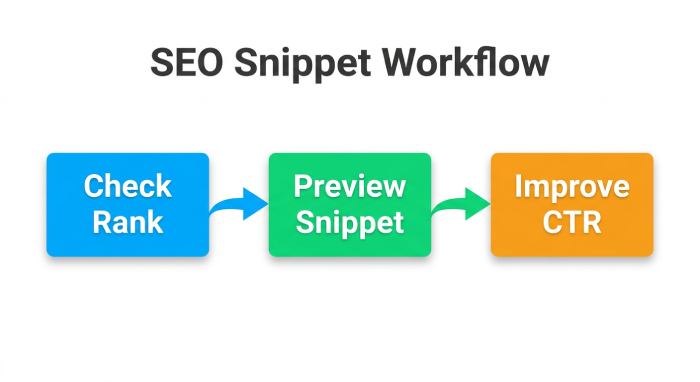
Ranking is only part of organic search success. Use a SERP Simulator or SERP Snippet Preview Tool to refine the title tag, meta description, snippet preview, and SERP snippet. A better organic snippet can improve click-through rate, and the ability to save snippet drafts helps maintain a unique page title across important landing pages.