01
What is SeoWorx?
SeoWorx is a Chrome extension that puts professional SEO metrics where you already work — inside Google's search results and on every page you visit. No extra tabs, no copy-paste, no separate dashboard to wire up.
It surfaces five families of signals, pulled live as you browse:
- Authority (Moz)Domain & page authority, spam score, backlinks.
- Traffic & keywords (SpyFu)Organic clicks, traffic value, rank, budget.
- Backlinks (DataForSEO)The top pages linking to a site, ranked by authority.
- On-pageHeadings, word count, links, canonical — read live.
- Tech stackCMS, CDN, frameworks and hosting fingerprint.
02
Install in Chrome
SeoWorx installs in one click from the Chrome Web Store — no setup and no API keys to configure. It's live the moment you search.
- Open the SeoWorx listing and click Add to Chrome.
- Pin the SeoWorx icon to your toolbar so the popup is one click away.
- Run a Google search, or open the side panel on any page. Your first 100 credits are free — no account required.
03
The SERP overlay
As you search Google, SeoWorx drops a compact bar under each organic result — so you can size up the competition before you click. To keep your credits under your control, the data loads on click: each bar reads “click to see [site] data”, and only fetches that result's metrics when you click it. So you spend credits only on the results you actually want to check, not every result on the page. Expand any loaded result for the full provider breakdown (On-Page, Moz, SpyFu).
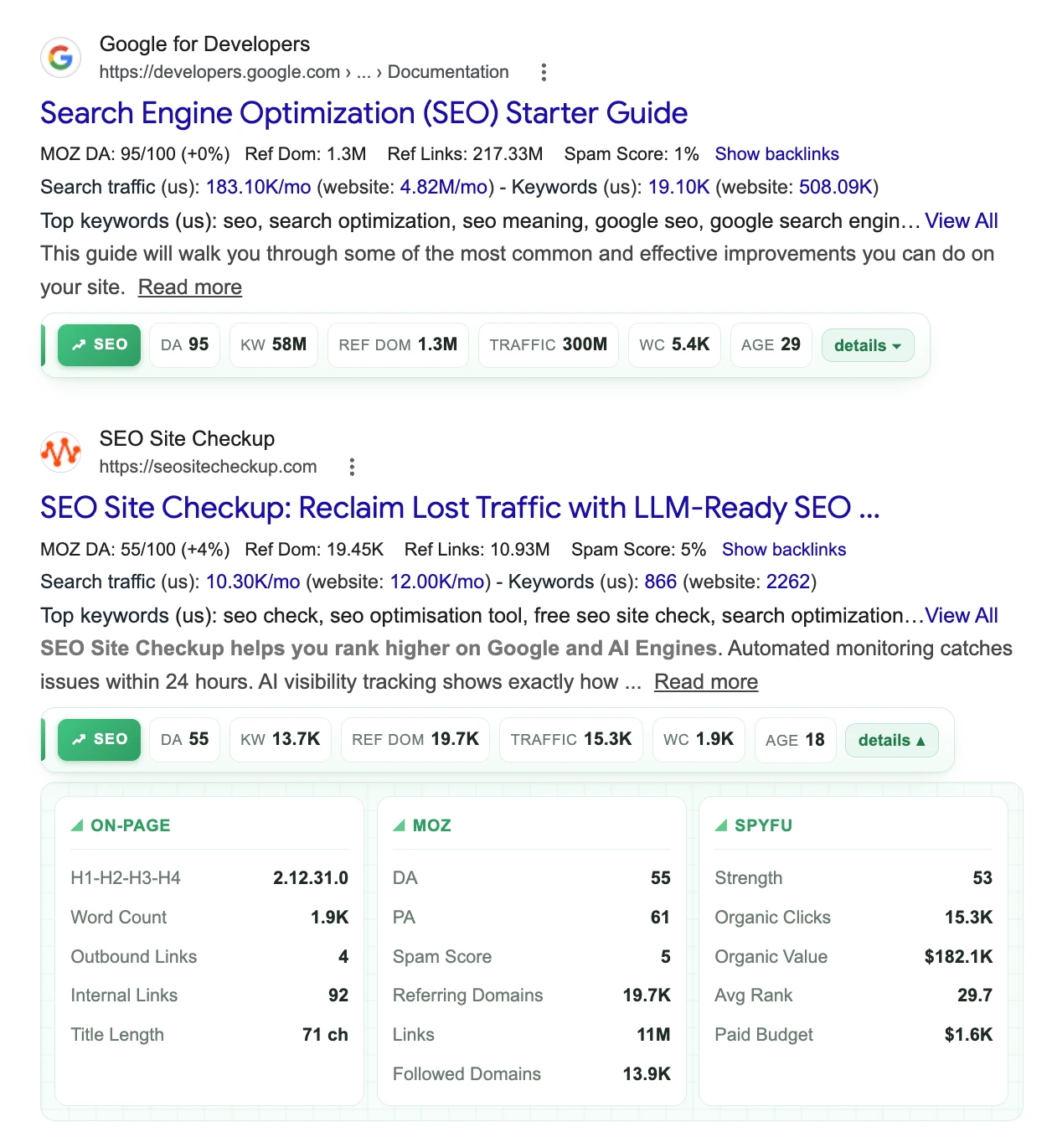
Once loaded, the bar shows headline numbers — Domain Authority, keywords, referring domains, traffic, word count and domain age — and never gets in the way of the result itself.
A floating SeoWorx icon sits at the top-left of the results page — click it to hide or show these inline metrics without leaving Google. The logo is green when metrics are showing and greyed out when they're hidden; your choice is remembered.
04
The side panel
On any website, click the floating SeoWorx launcher on the left edge of the page (or the toolbar icon) to slide open the side panel — the complete breakdown for the current page, grouped by source.
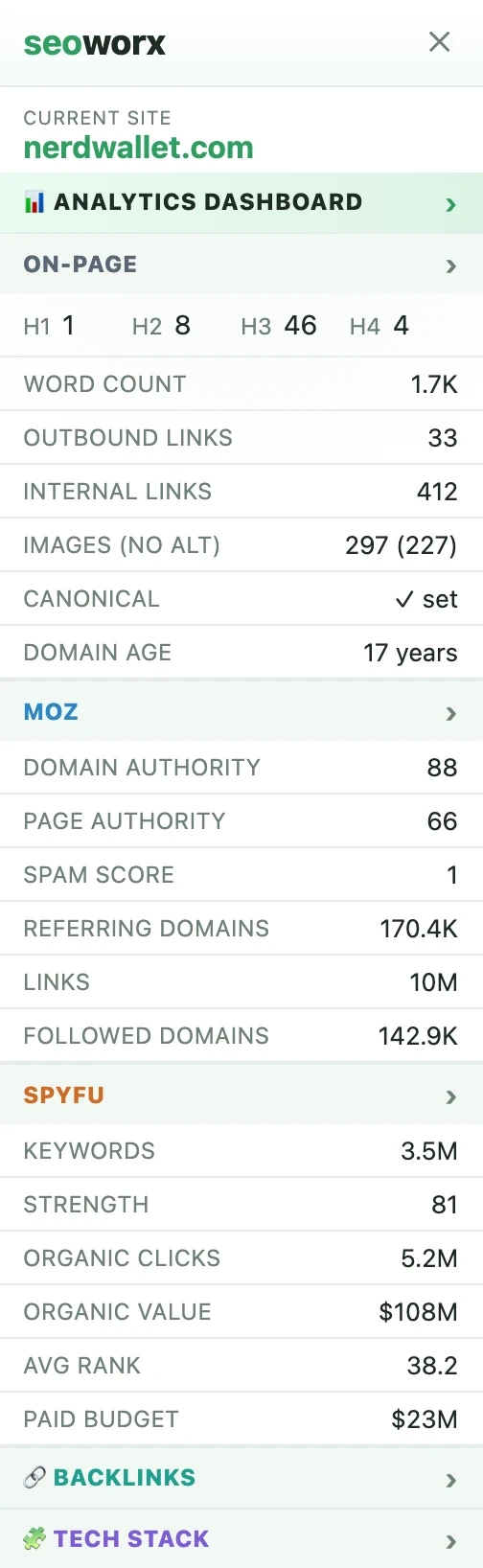
Each section header is clickable — it opens the matching tab in the analytics dashboard for a deeper look. The On-Page numbers are read live from the page's DOM, so they always reflect what's actually rendered. The Backlinks and Tech Stack sections are fetched on demand — they only spend credits when you open them.
05
The analytics dashboard
The analytics view is the deep dive — a twelve-month trend of the domain's organic traffic, value and keywords, plus the movers (gained, lost, newly ranked), most valuable keywords, and top competitors.
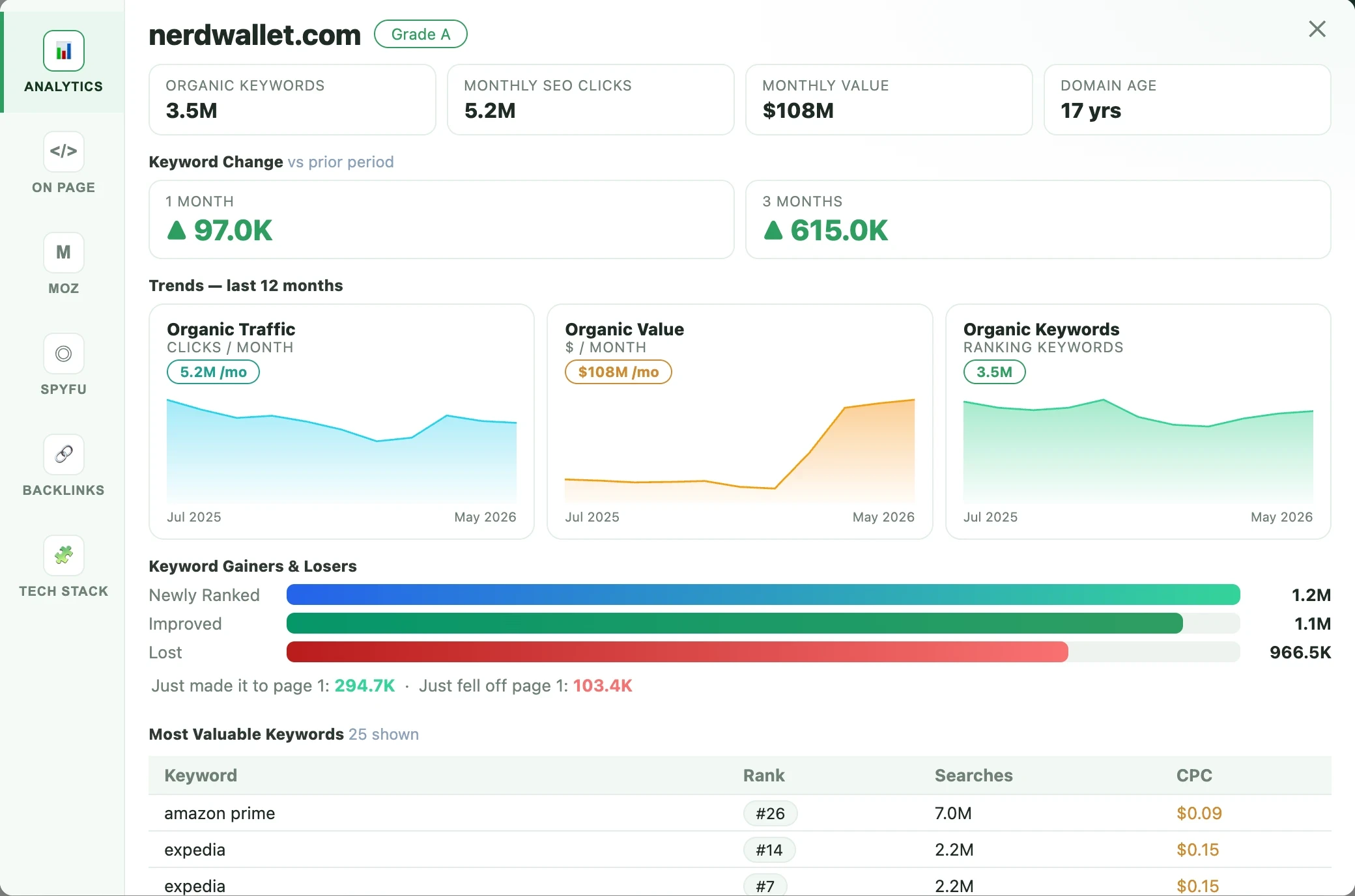
The Most Valuable Keywords table shows the top 25 by default (included in the analytics view). Need the full picture? A Load all 100 keywords button pulls the next 75 on demand — it costs an extra 65 credits and is charged only if you click it, so you never pay for the long list unless you want it.
06
X-Ray Cloud
X-Ray Cloud runs a full SEO report on any domain from the web — no extension needed. Sign in, enter a domain, and SeoWorx pulls the same metrics the toolbar shows — domain authority, keywords, traffic, backlinks, on-page and tech stack — into one shareable page at seoworx.org/xray/[domain].
Each report includes:
- The full analytics dashboard — twelve-month trends, most valuable keywords, competitors, and gainers & losers.
- Moz, SpyFu and DataForSEO metrics plus live on-page data and domain age.
- A shareable public URL you can send to a client or prospect.
- PDF and JPG downloads of the whole dashboard (for signed-in users).
Each X-Ray Cloud run costs 250 credits and is charged only when real data comes back. Start one from the X-Ray Cloud page — every public report lives there too.
07
Metrics reference
Every number SeoWorx surfaces, grouped by where it appears — the on-page reader, the Moz and SpyFu sections of the side panel, the analytics dashboard, and the tech-stack detector. This is the complete glossary.
On-Page
Read live from the DOMParsed in-browser from the page you're on — no crawler, always current. Shown in the side panel and the On-Page tab.
- H1 – H4
- Count of each heading level on the page — the content hierarchy and structure.
- Word Count
- Total body words — distinguishes thin pages from in-depth content.
- Outbound Links
- Links pointing to other domains.
- Internal Links
- Links to other pages on the same site.
- Images (no alt)
- Total images, and how many are missing alt text (accessibility & image SEO).
- Canonical
- Whether a canonical tag is set — controls duplicate-content signals.
- Meta Title Length
- Character length of the <title>; ~50–60 characters is ideal.
- Meta Description Length
- Character length of the meta description; ~120–160 is ideal.
- Mobile Friendly
- Whether the page renders responsively for mobile devices.
- Time to First Byte
- Server response latency in milliseconds — a speed signal.
- Page Load Time
- How long the page takes to fully load, in seconds.
- Domain Age
- How long the domain has been registered — older domains often carry more trust.
Moz — Authority
MozThe trust verdict: how authoritative the domain and page are, and the backlink profile behind it.
- Domain Authority (DA)
- A 1–100 score predicting how well the whole domain ranks. Higher is stronger.
- Page Authority (PA)
- The same 1–100 prediction for the specific page.
- Spam Score
- Percentage of similar sites Moz has seen penalized — lower is better.
- Referring / Linking Domains
- Number of unique domains that link to the site — a core authority signal.
- Links
- Total inbound links (backlinks) pointing at the site.
- Followed Domains
- Linking domains that pass link equity (dofollow), not nofollow.
- External Links
- Outbound links tracked by Moz for the page.
Backlinks
DataForSEOThe strongest pages linking to a site — one row per referring domain, ranked by authority. Opened on demand from the Backlinks section (side panel) or tab (main view).
- Referring page
- The URL and domain of the page that links to the site.
- Anchor
- The clickable text used in the link — a relevance signal for the target.
- Rank (Domain Rank)
- Authority of the linking domain on a 0–1000 scale; higher means a stronger link.
- Type (dofollow / nofollow)
- Whether the link passes ranking equity (dofollow) or not (nofollow).
- Referring Domains
- Total unique domains linking to the site (headline count, from Moz).
- Total Backlinks
- Total inbound links pointing at the site (headline count, from Moz).
SpyFu — Traffic & keywords
SpyFuOrganic reach, what it's worth, and how aggressively the domain competes — in the side panel and SpyFu tab.
- Keywords
- Number of organic search terms the domain currently ranks for.
- Strength
- SpyFu's overall domain-strength score.
- Organic Clicks
- Estimated monthly clicks the domain earns from organic search.
- Organic Value
- What that organic traffic would cost to buy via ads — a dollar proxy for SEO value.
- Avg Rank
- The domain's average ranking position across its keywords.
- Paid Budget
- Estimated monthly pay-per-click ad spend.
Analytics — Trends & movement
Analytics dashboardThe deep dive: twelve months of history plus the period's keyword movement, top keywords and competitors.
- Organic Keywords
- Headline count of ranking keywords, with a 12-month trend chart.
- Monthly SEO Clicks
- Headline organic traffic, with a 12-month trend chart.
- Monthly Value
- Headline traffic value in dollars, with a 12-month trend chart.
- Keyword Change (1 mo / 3 mo)
- Net change in ranking keywords versus the prior 1- and 3-month periods.
- Newly Ranked
- Keywords that started ranking in this period.
- Improved
- Keywords that moved up in position.
- Lost
- Keywords that dropped out of the rankings.
- Just made it to page 1
- Keywords that newly entered the top 10 results.
- Just fell off page 1
- Keywords that dropped out of the top 10.
- Most Valuable Keywords
- Top keywords by value, with rank, monthly search volume and CPC. Top 25 shown by default; load all 100 on demand.
- Top SEO Competitors
- Other domains competing for the same keyword footprint.
Tech Stack
DetectionThe technology fingerprint of the site, detected as you browse — in the side panel and Tech Stack tab.
- Server Location
- Where the site is hosted, including the CDN in front of it.
- Technologies
- How many distinct technologies were detected.
- Detected technologies
- The list itself — CMS, frameworks, CDN, analytics, hosting and more.
08
Themes
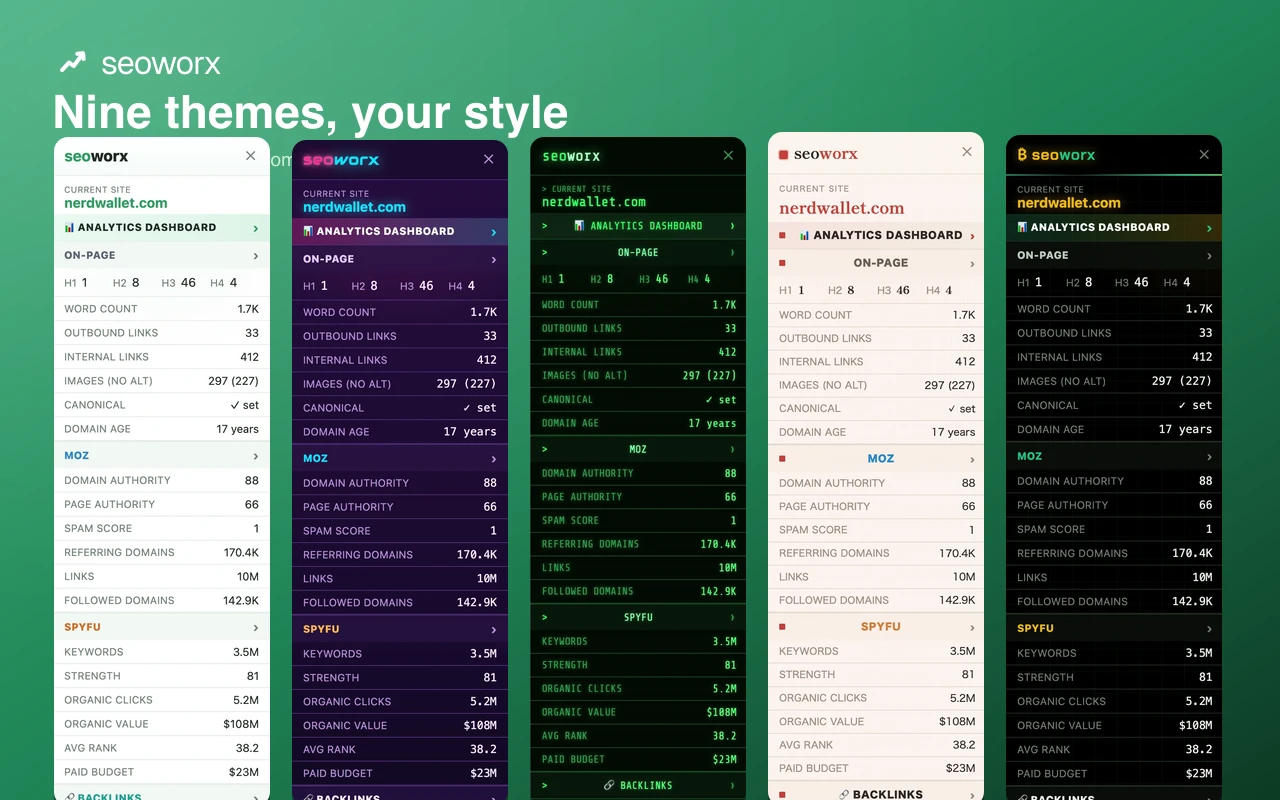
Match SeoWorx to your style. The default Classic theme is a clean, light look in the SeoWorx signal green. Prefer the dark, corporate navy? Switch to Jazz. There are nine themes in all — including Neo, Nebula, Satoshi, Synthwave, Terminal, Sakura and Newsprint.
Open the popup (toolbar icon) and pick a theme from the grid at the bottom. Your choice applies everywhere — the SERP overlay, the side panel and the analytics dashboard — and is remembered across sessions.
09
Credits & plans
SeoWorx is credit-based: one pool of monthly credits unlocks the whole toolset. You spend credits only when you pull data, so light and heavy users pay for what they actually use.
- A SERP result costs 5 credits — you click a result's bar to load it, so you only pay for the results you check.
- A side-panel view costs 5 credits; an analytics view 38.
- The on-demand sections charge only when you open them: the tech stack is 17 credits, the backlinks list is 40, and loading all 100 valuable keywords in analytics is 65.
- Everyone starts with 100 trial credits — no account, no card. Create a free account to keep going, or choose a plan for more monthly credits.
- Out of credits before month-end? Top-ups stack on top and never expire.
See the pricing page for the current tiers, or check your balance any time in the popup.
10
Referrals & affiliates
Share SeoWorx and get rewarded two ways. Grab your unique link from the Earn Credits & Commissions page, or read the affiliate overview.
- Referral credits: when someone signs up through your link and confirms their email, you earn 2,000 credits into your never-expiring top-up balance — no limit.
- Affiliate commission: when a referred user becomes a paying customer, you earn a 30% cash commission on their first payment, paid to your PayPal.
Commissions are reviewed before they become payable, and payouts go to your PayPal once your approved balance passes the minimum. Add your PayPal email and track referrals, commissions and payouts on the Earn Credits & Commissions page.
11
Pausing & privacy
The popup has a power toggle in the header — green when active, red when paused. Turning SeoWorx off hides the launcher on every page and stops decorating search results, so no credits are spent until you switch it back on.
On data: the extension reads the current page's content (headings, links, word count) only to compute on-page metrics, and signs you in to your account. It does not keep a per-user log of the pages you browse. Full details are in our privacy policy.
12
FAQ
Do I need an account to try it?
No. The first 100 credits work anonymously — just install and search. Create a free account when you want to keep going.
Why don't metrics show on a result?
Make sure the power toggle in the popup is green, and that you have credits remaining. Metrics render on Google's organic results, not ads or special blocks.
The launcher icon isn't showing.
It's hidden on Google search domains (so it doesn't overlap the SERP overlay) and whenever SeoWorx is paused. On other sites, check the power toggle is on.
Where do the numbers come from?
Moz (authority/backlinks), SpyFu (keywords/traffic), live DOM reads (on-page), and detection (tech stack). The extension calls the SeoWorx backend, which holds all API keys — never the extension itself.
How do I cancel?
Manage or cancel your plan any time from your dashboard. See the refund policy for the 14-day window.
Ready to read the web like an analyst?
Add SeoWorx to Chrome and start with 100 free credits — no account needed.