August 21, 2026 · asma
5 Free On-Page SEO Checker Tools for Quick Website Audits
Discover 5 free on-page SEO checker tools that can help you quickly identify technical errors, on-page optimization issues, crawlability problems, and performance gaps. This guide covers Google Lighthouse, Screaming Frog, Ahrefs Webmaster Tools, Bing Webmaster Tools, and SeoWorx, with practical tips on what each tool checks and when to use it. Learn how to combine these tools for faster website audits, better page optimization, improved search visibility, and more effective SEO workflows.
How to Use Free Tools for a Fast SEO Audit
A free on page seo checker can quickly reveal technical errors, on-page SEO issues, and optimization gaps before they affect search engine rankings. While no single seo checker replaces a full technical SEO audit, combining multiple tools gives you a more complete view of crawlability, page quality, content quality, mobile optimization, page optimization, and compliance with search engine guidelines.
For a quick benchmark, tools such as the Seobility SEO Checker and Wincher’s free on-page SEO checker are useful alongside the five tools below. They help validate meta information, meta titles, meta descriptions, meta tags, internal links, external linking, anchor texts, and heading hierarchy while also supporting keyword ranking monitoring and competitor comparison workflows.
What a Good Website Checker Should Review
A reliable website checker should evaluate more than a single seo score. Look for coverage across page urls, domain names, subdomains, canonical links, language declarations, duplicate content, mobile-friendly rendering, alt attributes, h1 headings, and page & link structure.
Priority Audit Areas
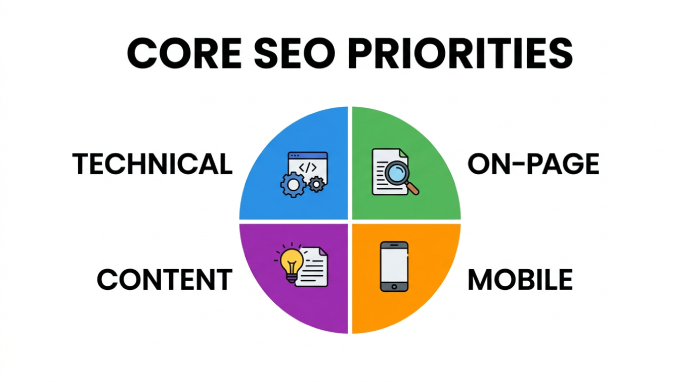
The best on page seo checker setup should help you identify high-impact issues such as broken internal links, poor server response times, excessive CSS requests, heavy JavaScript requests, missing canonical tag implementation, redirect chains, and http header problems caused by server configuration or Cloudflare rules.
Why This Matters for AI Search
Search visibility now extends beyond Google results into ChatGPT, Perplexity, AI answer engines, AI bots, AI crawlers, and LLM-based search tools. Strong AEO depends on clean HTML, clear content quality signals, accessible pages, and search engine guidelines that make your content easier to crawl, interpret, and cite.
Tool #1: Google Lighthouse — Check Core Web Vitals, Accessibility, and Technical SEO Basics
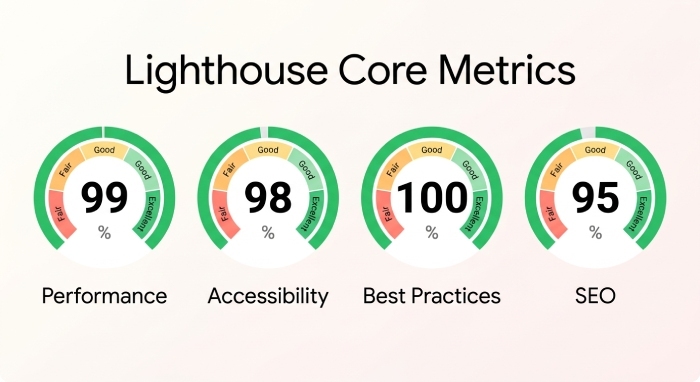
Google Lighthouse is one of the fastest ways to run a lightweight seo audit directly in Chrome DevTools. It checks performance, accessibility, best practices, and SEO basics, making it ideal for diagnosing technical errors before they become larger on-page SEO issues.
Best Use Cases for Lighthouse
Use Lighthouse when you need a fast website checker for mobile optimization, Core Web Vitals, mobile-friendly rendering, image sizing, JavaScript execution, and page performance. It is especially helpful for spotting slow server response times, unused CSS, render-blocking JavaScript, and weak accessibility signals such as missing alt attributes.
What Lighthouse Checks Well
Lighthouse reviews title and description presence, crawlability basics, tap target sizing, HTTPS usage, robots directives, and whether links are crawlable. It can also flag optimization problems related to HTML files, CSS requests, JavaScript requests, and framesets.
Where Lighthouse Is Limited
Lighthouse is not designed for keyword ranking monitoring, backlink tracking, backlink profile evaluation, or detailed competitor comparison. Pair it with a broader seo checker such as SEOptimer when you want a more business-friendly summary, PDF reports, and a task list for page optimization.
Tool #2: Screaming Frog SEO Spider Free Version — Crawl Up to 500 URLs for Titles, Meta Descriptions, Headings, and Broken Links
Screaming Frog SEO Spider’s free version is a powerful desktop crawler for smaller sites, allowing you to crawl up to 500 page urls. For a technical SEO audit, it is one of the best free options for finding technical errors across a domain or subdomain.
Best Use Cases for Screaming Frog
Use Screaming Frog when you need to inspect meta titles, meta descriptions, h1 headings, h2 usage, canonical links, status codes, redirect chains, duplicate content, and internal linking at scale. It is especially useful for auditing page & link structure and finding broken internal links or problematic external links.
On-Page Data You Can Extract
The crawler shows meta information, meta tags, canonical tag targets, anchor texts, response codes, indexability status, and duplicate page elements. This makes it ideal for identifying on-page SEO issues that a single-page on page seo checker may miss.
Practical Workflow
Start with your main domain, crawl the site, export missing meta descriptions, long meta titles, duplicate h1 headings, broken links, and redirect chains. Then turn those findings into a prioritized task list based on high-impact issues, page quality, and expected optimization value.
Tool #3: Ahrefs Webmaster Tools — Audit Verified Websites for On-Page SEO Issues and Optimization Opportunities
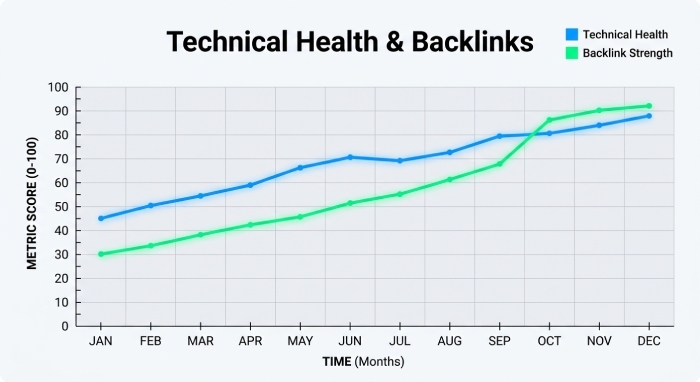
Ahrefs Webmaster Tools is valuable because it combines site auditing with backlink tracking for verified websites. While many free seo checker tools focus only on a single URL, Ahrefs helps you understand on-page SEO issues in the context of backlinks, keyword positions, and search engine rankings.
Best Use Cases for Ahrefs Webmaster Tools
Use it to detect crawlability problems, missing meta tags, duplicate content, internal linking weaknesses, and optimization gaps across verified properties. It also helps connect technical errors to broader SEO performance, including backlink profile strength and keyword ranking monitoring.
Why Backlink Context Helps
A page with strong backlinks but weak page optimization may represent a major opportunity. By comparing backlink profile data with page quality, meta information, and internal links, you can decide whether technical fixes, content quality improvements, or external linking adjustments should come first.
For another quick website checker perspective, the Website SEO Checker Chrome extension can help review pages while browsing competitors, LinkedIn profiles, partner pages, or landing pages built with platforms and tools such as Elfsight, Intercom, Hotjar, Firstpromoter, and Cookiebot.
Tool #4: Bing Webmaster Tools Site Scan — Find Crawl Errors, Missing Tags, and Common SEO Problems for Free
Bing Webmaster Tools Site Scan is an underrated free seo audit feature. It helps identify technical errors, crawl issues, missing meta descriptions, missing title tags, broken links, and other common on-page SEO issues that can affect Bing and, indirectly, broader search visibility.
Best Use Cases for Bing Site Scan
Use Bing Site Scan to validate search engine guidelines beyond Google. It can help confirm whether your pages are easy to crawl, whether redirects are clean, and whether meta information is properly configured across key page urls.
Common Problems It Finds
Bing can surface missing titles, thin content, non-indexable pages, blocked resources, duplicate content, and weak heading hierarchy. These findings are useful for creating an optimization task list that supports both traditional search and AEO visibility in AI answer engines.
Pairing Bing With Other Checkers
Because every website checker has a different crawler and scoring model, compare Bing findings with another on page seo checker such as the Yoast SEO checker or SEO Site Checkup. This competitor comparison approach helps reduce false positives and highlights recurring high-impact issues.
Tool #5: SeoWorx — Analyse Key On-Page SEO Factors and Page Performance
SeoWorx is useful for quick on-page reviews because it focuses on key page-level factors, performance signals, and practical optimization feedback. As an on page seo checker, it can support fast audits of page quality, meta tags, headings, links, and technical errors.
Best Use Cases for SeoWorx
Use SeoWorx when you want a simple website checker for checking meta titles, meta descriptions, h1 headings, internal links, external links, page performance, and common on-page SEO issues. It is especially helpful when reviewing landing pages, service pages, blog posts, or competitor pages for competitor comparison.
What to Check First
Start with the seo score, then review missing or duplicated meta information, weak heading hierarchy, broken anchor texts, absent alt attributes, canonical links, language declarations, and mobile optimization. If the tool flags slow load times, investigate server response times, CSS requests, JavaScript requests, HTML weight, and server configuration.
How to Combine SeoWorx With a Broader Workflow
Use SeoWorx for fast page checks, Screaming Frog for sitewide crawling, Lighthouse for performance, Ahrefs for backlink profile and keyword positions, and Bing Site Scan for additional crawlability validation. If you need another dedicated page-level audit option, Sitechecker’s on-page SEO checker can help compare optimization gaps, technical errors, and on-page SEO issues across important URLs.
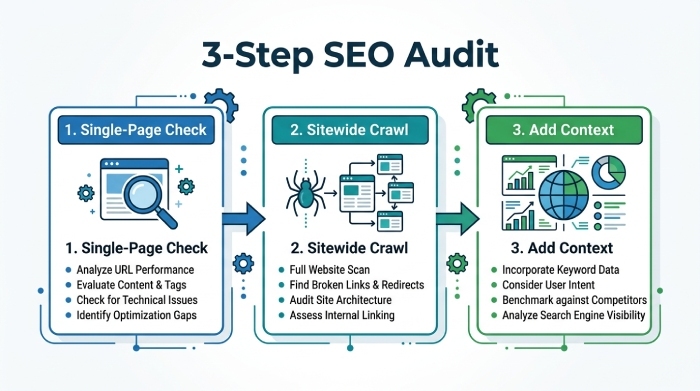
Recommended Quick Audit Workflow
Step 1: Run a Single-Page SEO Checker
Begin with an on page seo checker to review one important page. Check meta tags, canonical tag setup, h1 headings, content quality, internal linking, external linking, alt attributes, and mobile-friendly layout.
Step 2: Crawl the Site for Technical Errors
Next, use a crawler to identify technical errors across the domain, including redirects, broken links, duplicate content, missing meta descriptions, and page urls with poor crawlability.
Step 3: Add Keyword and Competitor Context
Finally, connect findings to keyword ranking monitoring, competitor comparison, backlinks, and search engine rankings. This ensures your seo audit does not only produce pdf reports, but also a practical task list focused on high-impact issues and measurable optimization gains.